Thursday, April 19, 2012

Ashampoo Red Ex v1.0.0 2011


 Red-eye effect – No longer an issue with Ashampoo Red Ex
Never again red eyes in your digital photos!
Who doesn’t know this: On a party lots of photos are taken and later when looking at the pictures, you realize that the eyes of a lot of guests appear red. This is really annoying!
Nevertheless, this flaw does not mean the end of beautiful and precious pictures full of memories. Without a big effort red eyes can be retouched easily with Ashampoo Red Ex. And thanks to excellent results you can still enjoy your pictures.
Thanks to Ashampoo Red Ex you will never be annoyed about red eyes on your digital photos.
The red-eye effect occurs when a photo is taken with flashlight and this meets the eyes in an unfavorable angle. Then the retina reflects the flashlight and the eyes appear red.
Ashampoo Red Ex contains a sophisticated technology that automatically detects red eyes on the basis of defined parameters. The program replaces the red with a darker more natural tone, as if the red eyes had never been there.
For the use of the automatic detection of red eyes, you just have to drag a frame with your mouse around the area with the red eyes and Ashampoo Red Ex will do the rest for you. Of course, a manual red-eye removal is always possible.
Features:
• Auto / manual red-eye correction
• Load / Save these formats: JPG, BMP, PNG, TGA and TIF
• Quickly compare with the original
• Convenient editor view your photos as thumbnails
• Easy description of each step directly into the editor
Enabling | reg code: serial
Language: ML
Platform / OS: Microsoft Windows 2000/XP/Vista/7

Install Help

Run ashampoo_red_ex_e1.0.0_sm.exe
To Install Ashampoo Red Ex v1.0.0 2011
follow The Onscreen Instructions By The Installer
When Finish Installing, Untick -> [ Launch Ashampoo Red Ex ]
And Click Finish, To Complete The Setup, If Your Browser Or A New Tab Opens
And Directs You To The Product Site Just Close The Tab Or Browser, Now Dont
Start The Program And Make Sure Its Not Running, Now Go To The Folder
[  Patch ] And Double Click The Reg-Patch.reg
Done Enjoy !!! .



Ashampoo Photo Optimizer 4


Ashampoo Photo Optimizer is just another program designed by Ashampoo; a publisher already making a name for itself in the area of remarkable applications. Ashampoo Photo Optimizer enables you touch up your digital photos fast. The application is so easy to understand that users do not need to read a manual; as a matter of fact, all user requires is to point and shoot, then he can click and go. Ashampoo Photo Optimizer is not created to replace major graphics programs; it gives you everything needed when you want results fast.
Ashampoo Photo Optimizer is also an application that doubles as a fast image viewer with a full Explorer-style directory view showing all the drives and folders on your computer for quick and hitch-free access. Since it works for digital camera, it allows you to view the images in your camera as soon as it is connected to your computer. In Windows Explorer you can right-click on any photo file to load it into Photo Optimizer for instant editing.Ashampoo Photo Optimizer comes with the following features: easy brightness and contrast sliders; automatic backup (all edits can be easily reversed as soon as possible); one-click image rotation; select and click red eye rotation; and a couple of others.
 

Vray 2 For 3d Studio Max 2011


V-Ray 2.0 for 3ds Max​ is a complete rendering solution, which combines the power of the distinguished V-Ray rendering engine with the flexibility and unprecedented speed of the interactive rendering system V-Ray RT, now running on GPUs. V-Ray 2.0 is officially on the market starting 6th December 2010.
• V-Ray RT and V-Ray RT GPU interactive renderers are included as part of the V-Ray installation;Shading
• VRayCarPaintMtl material with accurate flakes simulation;
• VRayDistanceTex texture that measures distances to arbitrary mesh objects;
• Dispersion in the VRayMtl material, utilizing the new support for wavelength-dependent ray tracing;
Lights
• V-Ray specific light lister;
• Directionality parameter for rectangle V-Ray lights to turn them into (textured) spot lights;
Render Elements
• VRayLightSelect render element to extract the contribution of individual lights;
• VRayDRBucket render element to show which machine rendered a given bucket in DR mode;
Effects
• VRayLensEffects render effect for producing glow and glare with support for obstacle images and diffraction;
• VRayExposureControl plugin for proper exposure of regular viewport and camera views;
Optimizations
• VRayStereoRig controller for easy stereoscopic setup;
• Shade maps for faster rendering of stereo images, DOF and motion blur through the VRayStereoscopic
helper;
• Retrace threshold for the light cache
• Dynamic loading of tiled OpenEXR textures through the VRayHDRI texture;
• Integration of the various V-Ray components in the 3ds Max “Create” menu;
• Tools for calculating and rendering accurate camera distortion through .lens files;
• Faster rendering of VRayProxy objects;
• Support for proper motion blur of Thinking Particles;
• Proper blending of gizmos for VRayEnvironmentFog;
• Improved raytracing precision in certain cases;
• Render history for the V-Ray VFB;
• Load and compare images directly in the V-Ray frame buffer;
• Support for rendering of VRayProxy objects as point clouds;
• Better representation of V-Ray lights in the new hardware viewport for 3ds Max 2010 and later;
• Support for bidirectional path tracing for accurate unbiased lighting solutions;
…and many other small fixes and improvements


Sharpener Pro V.3.005


Nik Software Sharpener Pro 3.005 its popular photographic plug-in for use with Adobe Photoshop. Designed for professionals and photo enthusiasts,Sharpener Pro 3 is the most advanced and powerful sharpening solution for photographers,eliminating the guesswork typically required for achieving superior and consistent results.
Now featuring Nik Software’s patented U Point technology,Sharpener Pro 3.002 enables photographers to selectively sharpen objects within their images. U Point powered Control Points are easy to use and offer precise control over sharpening intensity without the need to create complicated selections and layer masks.
“Sharpener Pro 3.005 has been dramatically improved with a range of new features,including powerful creative sharpening tools,a soft proofing option,and integrated U Point technology,” said Michael J. Slater president and CEO of Nik Software. “This new version of Sharpener Pro offers the most comprehensive tools for optimally sharpening images for any output device while also offering photographers the complete control they expect,” Slater concluded.
Key Features:
New U Point Powered Control Points – Enables precise,selective sharpening control
Updated Output Sharpening – Provides the ultimate control to create perfectly sharpened images on all devices and media types such as display,inkjet,continuous tone,half tone,and hybrid tone
New Creative Sharpening – Enhances fine details and textures with new structure,focus,and local contrast tools for drawing attention to desired areas within the image
New Industry-First Sharpening Soft Proof – Allows detailed inspection of sharpening results on screen before printing,eliminating costly test prints
New Output Presets – Enables custom settings to be saved for consistent,professional results
Updated RAW Presharpener – Retains and enhances sharp details within images without amplifying noise and other artifacts
Updated Powerful Selective Tool (Photoshop only) – Enables the use of Photoshop’s brush tools to paint in sharpening selectively
New Smart Filter Support (Photoshop only) – Provides compatibility with Adobe Photoshop’s Smart Objects enabling adjustments to sharpening after Sharpener Pro has been applied
System Requirements:
Microsoft Windows 2000,Windows XP,Windows Vista,Windows 7
Adobe Photoshop CS2 through CS5 (32-bit and 64-bit compatible),Adobe Photoshop Elements 6.0 through 8.0; other Adobe Photoshop plug-in compatible application

Anvsoft Flash Slideshow Maker Professional v4.7

Flash Slideshow Maker is a Flash album creator to make animated photo slide show with SWF file as the output format. It transforms your digital photo collection to Macromedia Flash file format ( SWF ) which you can share your memorial moments with your family or friends on your own homepage, post on your Blog or upload to your own website. Flash Slideshow Maker is the ideal tool for create slide show widget for your website quickly and easily.

With Flash Slideshow Maker, you can easily turn a folder full of still images into a stunning Flash slide show presentation with background music and special transition effects . This Flash animate builder tool can be used to build Flash album for website, image scroller banner, decorate your photos on MySpace, facebook,blogger. etc.
Flash Slideshow Maker is a Flash album creator to make animated photo slide show with SWF file as the output format. It transforms your digital photo collection to Macromedia Flash file format ( SWF ) which you can share your memorial moments with your family or friends on your own homepage, post on your Blog or upload to your own website. Flash Slideshow Maker is the ideal tool for create slide show widget for your website quickly and easily.


XUD Desltop Pro Edition 1.7.7.2

XUS Desktop is a powerful desktop icon manager application. With XUS Desktop, you can easily organize your windows desktop icons. It can make your windows desktop clear, beautiful, and let you to handle shortcut icons. XUS Desktop also offers a new, easy, fast & swift way to launch the program.It will free your windows desktop icons. If you are tired with Windows desktop, please try XUS Desktop – it is the best desktop application you have ever used. You will feel like using XUS Desktop all the time.Key features:
* Easy to organize your windows desktop icons;
* Fast & swift way to launch the program;
* Make you windows desktop clear and beautiful;
* Offers a different & wonderful feel to use your computer;
* More useful and helpful functions;
* Offers a perfect solution to handle too much desktop icon’s problem.
OS : Win XP/2000/Vista/Win 7
Language : English


Wednesday, April 18, 2012

Aurora 3D Presentation 2012 12.04.18


Aurora 3D Presentation 2012 12.04.18 Multilingual | 80 Mb

When you want your audience to truly be interested in your material, you don't try to get your message across in mere words! You use snappy graphics, and charts, and images! But instead of juggling a smorgasbord of presentation applications for different uses, why not just consolidate all of your presentation magic-making into Presentation3D?

Top 10 reasons to use Presentation 3D
1. Easily to generate cool presentation for image, text, video, model and data.
2. Don't need the basis of 3D design.
3. Choose many ways to display your content.
4. Don't need to learn Flash, AE, Photoshop and other 3D Application to create great looking presentation.
5. Choose and use many included design elements, include backgrounds, themes, styles, shapes, effects and so on.
6. Real 3D space, real 3D object.
7. You can export the image or video files, and import other 3D model and texture by the 3D design software.
8. Learn some interesting effect of 3D software,Let you easily.
9. Save money on various 3D interactive design.
10.If you don't have the time, Presentation3D is your best choose, You'll get the high efficiency.


Tuesday, April 17, 2012

IcoFX 2.2


IcoFX Software IcoFX 2.2 Multilingual + Portable | 2.9/4 MB

IcoFX is an award winning professional icon and cursor editor. It is an all-in-one solution for icon creation, extraction and editing. It is designed to work with Windows XP, Windows Vista, Windows 7 and Macintosh icons supporting transparency.

Create icons and cursors
Create icons for Windows and Macintosh. Support for Windows Vista icons with PNG compression. Convert your Macintosh icons to Windows icons and vice versa. Support for static and animated cursors. Create a favicon for your website or blog.

IcoFX Batch process multiple files
You can easily work with multiple files using the batch processing capability of IcoFX. Create, convert, extract or export all your icons or cursors with just a few clicks.

IcoFX Adjustments and effects
With more than 40 effects at your fingertips, there’s virtually no limit to the icons you can create. IcoFX features a collection of intuitive color correction tools. Using these tools you can fine-tune hue, saturation, and luminance, adjust color levels, brightness and contrast.

IcoFX Images with layers

You can quickly create layer based images using IcoFX. It allows you to rearrange, blend layers and change their opacity. This gives you more control, and you can more easily change the image in the future.

IcoFX Import, export and extract
You can easily convert your favorite images into icons or cursors, or icons into images. Supported image formats BMP, PNG, JPG, JPG2000, TIF and GIF. With IcoFX you can extract icons from other files, including Windows Vista, Windows 7 and Macintosh files.

IcoFX Resource editor
IcoFX gives you the possibility to create icon libraries or change icons inside exe files. You can also create cursor libraries.

IcoFX Full assortment of tools
IcoFX features a full blown image editor with many useful tools. You can use different brush sizes, shapes, hardness, even blending modes when painting.

IcoFX Soft selections
With IcoFX’s collection of selection tools you can quickly and easily select any part of your images. You can then edit and apply special effects to portions of your image, remove unwanted objects or cut out objects from one image and paste into another. Using the QuickMask you can use the painting tools to refine your selections.


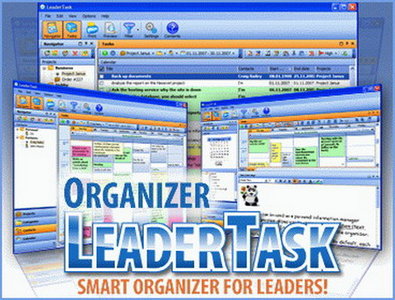
LeaderTask 7.4.0.0

LeaderTask 7.4.0.0 Multilanguage | 8.9 MB

LeaderTask is a business organizer for a modern person. LeaderTask has a smart system for managing projects, tasks, contacts, events. Want to complete more? Get tired less? Earn more? And permanently improve the quality of life, work hard less and contemplate peacefully more? LeaderTask will help you with that! LeaderTask = Scheduler + Personal Information Manager + Calendar + Address Book + Organizer! Forget the traditional task organizers. They are good if you live to work. They are great if you just want to plan things and be reminded. Have a life! Try the new generation organizer that helps you plan your work so efficiently that you have more free time than ever!

LeaderTask benefits:
Portability. You can always use LeaderTask wherever you are: at home, in office, on a trip or anywhere else. You can carry the organizer on a USB drive. Storing all data in one place allows you to easily move LeaderTask to other computers. All information will always be at hand wherever you are!

File container. Storing copies of files of any type. LeaderTask can store any files in its database: Excel spreadsheets, Word documents, images… Moreover, it does not store both files inside LeaderTak and links to external files.

Synchronization. Synchronization with Outlook, Google Calendar, Data Export/Import. Supporting most of popular data export/import formats: iCal, cvs, excel, txt..

LeaderTask Company Management is a program for managing the activity of a group of people - both small teems and large organizations. The LeaderTask system helps the head of a company quickly get information about the current state of affairs regarding projects, tasks, employees.

LeaderTask PDA Organizer is a mobile version of LeaderTask for Windows Mobile. With LeaderTask PDA Organizer you will not any longer need your paper notes: "To Buy" or "To Do at Work/ the Bank/Tax Inspectorate/ on My Way Home." You will always have the needed information at hand wherever you need it, because LeaderTask PDA Organizer will always be with you on your pocket computer.
.
 

WinZip Pro 16.5 Build 10095


WinZip Pro 16.5 Build 10095 + Portable

WinZip is the world's #1 zip utility for file compression, file sharing, file encryption, and data backup. With over 20 years of experience, we are constantly improving our software to provide you with the fastest, easiest way to zip/unzip files, share data, and protect your work!

New! WinZip 16.5
Zip and unzip files instantly with a NEW ultra-fast zip engine
Protect files by encrypting them as you zip
Zip and email files in one easy step
Back up and archive your data automatically
Send large files fast using our NEW ZipSend file delivery web service
Share files on Facebook with our new NEW ZipShare Facebook service
Tap into your PC’s full zipping power with NEW enhanced support for AMD processors


Related Posts Plugin for WordPress, Blogger...